In gathering sources for the last post, on piecewise-defined functions, I found a couple older discussions of how to graph them on graphing calculators, namely the TI-83 and TI-84. The questions are not at all outdated, and there are some interesting ideas here, so let’s take a look. This will be a little long, though we’ll see three different methods fairly early, all of which work.
A simple example, with an introductory explanation
First, from 2005:
Piecewise Functions on TI Graphing Calculators

I was wondering if someone could tell me how to graph a piecewise-defined function on a TI-83 plus graphing calculator?

None of the teachers in my high school know how to do it, and I have absolutely no clue how to do this.
I answered:
Hi, Mark.

I almost taught my class yesterday how to do this, but decided it wasn't worth the time it would take to explain it!  It's a little tricky, and I was teaching some other tricky things already.

Assuming you have the same TI-83 manual I do, look on page 17-4 where there is an example titled "Graphing Piecewise Functions".  They don't really explain what they are doing, so I'll supplement it.
Here is that example, downloaded from this TI-83 site:
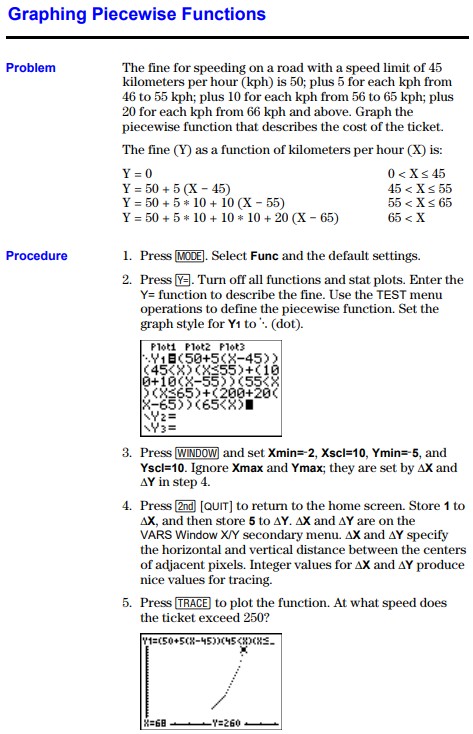
Essentially the same thing is in the newer TI-83 Plus manual (p. 567 in the PDF), which Mark probably had.
They have, without explanation, translated the definition $$f(x)=\left\{\begin{array}{l}0&\text{ if }0\lt x\le45\\50+5(x-45)&\text{ if }45\lt x\le55\\50+5\cdot10+10(x-45)&\text{ if }55\lt x\le65\\50+5\cdot10+10\cdot10+20(x-65)&\text{ if }65\lt x\\\end{array}\right.$$ to the equation
Y = (50 + 5(X - 45))(45 < X)(X ≤ 55) +
    (100 + 10(X - 55))(55 < X)(X ≤ 65) +
    (200 + 20(X - 65))(65 < X)
Spreading it out like this makes it a little more readable, but it still begs for explanation, which we’ll get to later.
(Note that I’ve replaced “<=”, which I had to use then, with ≤ for clarity.)
I used a simpler example and broke it down.
Let's take a simple case:

  f(x) = -x  if x < 0
         x^2 if x ≥ 0

Since there is no "if" operation (as there is, say, in Excel or in C) for use within an expression, we use the fact that a logical comparison has a "Boolean" value (true or false) which in the TI-83 means 1 or 0.  So the expression "x < 0" has the value 1 when x < 0 and 0 when x ≥ 0.
In an Excel spreadsheet, there is an IF function, used as “IF(logical_test, value_if_true, [value_if_false])” where the logical test is an expression whose value is taken as TRUE or FALSE (1 or 0), and determines which of the other values to use. If the value of x is in cell B2, then the formula “=IF(B2<0,-B2,B2^2)” will give the appropriate value for our function.
But the calculator lacks such a function; we will need to use the values 0 or 1 (for FALSE and TRUE), in calculations:
Now, if we multiply -x by (x < 0), then when x < 0 we will get -x, and when x ≥ 0 we will get 0.  We can do the opposite for the second piece of the function.  Our piecewise function, as entered in the calculator, is then

  Y1=(-X)(X<0)+(X^2)(X≥0)
The first term will result in \(-x\) when \(x<0\), and 0 otherwise; the second term is \(x^2\) when \(x\ge0\), and 0 otherwise. Adding them gives just what we want. (If the conditions did not cover all real numbers, then other values of x would result in 0; we’ll deal with that later.) Here is the graph:
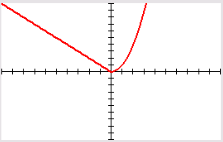
Both comparisons are entered using the Test menu. For more pieces, the middle ones will use something like (X>5)(X<10) to express the interval from 5 to 10.
We’ll see soon why we can’t enter “(5<X<10)” for this purpose.
(I am using an online emulator to both make pictures for this post, and check on facts I was not sure of when I had the next conversation, at which time my TI-83 had died.)
How the calculator handles intervals
In 2017, we had an extended discussion digging much deeper, starting with this question about a very slightly more advanced example:
Piecewise Functions on TI Graphing Calculators, Redux

To get some practice handling piecewise functions on a TI-84 calculator, I made one up:

   y = 3  (-10 ≤ x < 3)
   y = 5  (3 ≤ x ≤ 10)

But I did not get the expected y-values displayed.

I am not getting a syntax error, so I guess my format is correct. Maybe the TI-84 is returning the correct result for what I have entered, but it is not what I expected, or wanted.

On the TI-84, I entered the function as follows:

   y = (3)(-10 ≤ x < 3) + (5)(3 ≤ x ≤ 10)

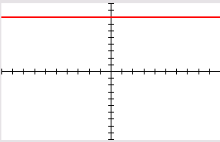
On the Standard Screen, the TI-84 is returning y = 8 for the x-values in the displayed domain of -10 ≤ x ≤ 10.

Is something messed up with my logic? Am I missing something simple?

I do get the correct result displayed if I change the function to

   y = (3)(x < 3) + (5)(3 ≤ x)

That is, I get a y-value of 3 for -10 ≤ x < 3, and a y-value of 5 for -3 ≤ x < 10.
Here is the graph for the first version, which is clearly wrong:

and here is the second, which is good as far as it goes:

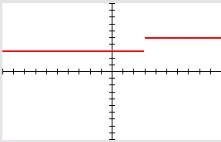
Only the interval \(-10\le x\le10\) is visible; zooming out would show an error, because each line will continue forever rather than stop at \(-10\) and \(10\). In fact, our formula doesn’t even mention those numbers!
The error in the first equation is one I mentioned in passing above: The calculator doesn’t interpret \(-10\le x\lt3\) the way we do.
I explained what was going wrong:
Hi, Michael.

You are assuming that -10 ≤ x < 3 is valid notation on the calculator.  But it doesn't "see" comparisons the way we do. The way it treats a comparison is as a function that returns one of two values: 1 for true or 0 for false.

You say you got the expected output from this function:

   y = (3)(x < 3) + (5)(3 ≤ x)

That is, in fact, the recommended style for piecewise functions -- and it is a trick. What it does is to evaluate the expression (x < 3), which is either 0 or 1, and multiply that by 3, so that the first term is 3 when x < 3 and 0 when x ≥ 3. Then it evaluates the second term, which similarly is either 0 or 5, and adds them.
This second attempt is just what we used in the first question, where there was only a single comparison. But we want more than that.
The point is that the calculator doesn’t see anything wrong with “\(-10\le x<3\)”, but it doesn’t mean what we want it to mean. Here’s what the calculator sees:
Nothing in here is actually "understood" by the calculator as a notation for domains; it is just a calculation.

When you enter -10 ≤ x < 3, it presumably does something like this (supposing that x is, say, 0):

   -10 ≤ 0 < 3
   \______/
       1    < 3      [i.e., it is true that -10 ≤ 0]
       \______/
           1         [i.e., it is true that   1 < 3]

(This seems to be what the manual says they do about the order of operations, but I can't be sure.)
(The stated order of operations puts “relational functions”, found on the TEST menu, after arithmetic operations and before logic functions, and implies left-to-right evaluation as I did here. So I was correct.)
So, odd as it is, the expression evaluates \(-10\le x<3\) as the expression \((-10\le x)<3\), treating “true” as the number 1 and comparing it to 3.
This happens to correctly say that the expression is true for x = 0. But it does so by comparing 1 to 3, where the 1 is not supposed to be a number, but rather "true"! So it really makes no sense.

Suppose we take x = 10:

   -10 ≤ 10 < 3
   \_______/
       1     < 3      [i.e., it is true that -10 ≤ 10]
       \_______/
            1         [i.e., it is true that   1 < 3]

It still says the expression is true, because 1 is still less than 3! So this won't do what you expect. Both of your "pieces" will be always "on," so it will get the value 3 + 5 = 8 everywhere.
This expression will always evaluate to “true”, because both 0 and 1 are less than 3! That’s why the graph just showed 8 everywhere.
Three valid ways to combine comparisons on the calculator
What you want is to say

   -10 ≤ x AND x < 3

Here, you could use the "and" operation (under LOGIC). But many people just multiply, because the product of two logical values is 1, i.e., true, only when both factors are 1, which is just what "and" does. Others prefer to divide, because division by zero is undefined, so the graph is left blank where it is not defined.
These are three different options. I showed how to do it with multiplication or a mix of multiplication and division:
For your function, I might do this:

   y = (3)(-10 ≤ x)(x < 3) + (5)(3 ≤ x)(x ≤ 10)

Or maybe this:

   y = (3)/(-10 ≤ x)(x < 3) + (5)(3 ≤ x)/(x ≤ 10)

Here, my goal is to display nothing when the first or last comparison fails, so I divided by those.
Here are the formulas and graphs for these methods (with 10’s changed to 6’s for clarity):
Multiplication method (which graphs 0 where the function should be undefined):
y = (3)(-6 ≤ x)(x < 3) + (5)(3 ≤ x)(x ≤ 6)

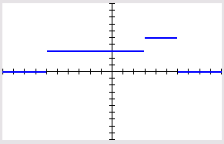
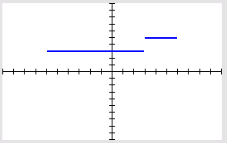
Mixed multiplication and division method as shown above (which correctly graphs nothing outside the domain; I’ll explain why in more detail later):
y = (3)/(-6 ≤ x)(x < 3) + (5)(3 ≤ x)/(x ≤ 6)

Using the AND operation (with multiplication, so it again graphs 0 where undefined):
y = (3)(-6 ≤ x and x < 3) + (5)(3 ≤ x and x ≤ 6)

Note that we need the parentheses around each interval, because the logic operations would otherwise be performed after the addition and multiplication; but since “and” is done after the comparisons, we don’t need parentheses around them.
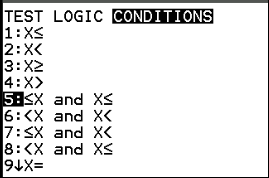
Incidentally, the conditions in the denominators can be created most efficiently using the CONDITIONS menu under TEST:
Division: Two ways that don’t work
Here are two alternatives that divide by a product, or by an “and” condition, that don’t work:
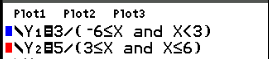
Division method with no multiplication (empty!):
y = (3)/((-6 ≤ x)(x < 3)) + (5)/((3 ≤ x)(x ≤ 6))

“And” method with division (empty!):
y = (3)/(-6 ≤ x and x < 3) + (5)/(3 ≤ x and x ≤ 6)

We’ll see why these fail, and how to fix them, later.
How the multiplication method works
So what’s going on in the complicated example from the manual? We’re ready for that now:
To see how the manufacturers do this in their example, check the manual's section on piecewise functions (p. 308, at least in my copy). They don't seem to like actually explaining what is happening; even in their online Knowledge Base, they just give examples.
This is page 315 of the PDF found here, which is virtually identical to the TI-83 example we saw:
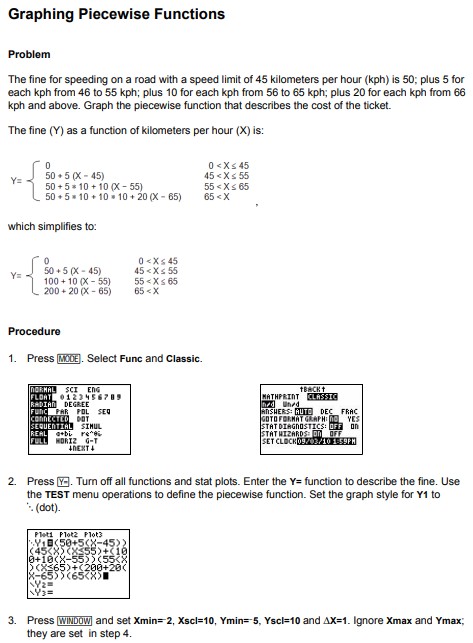
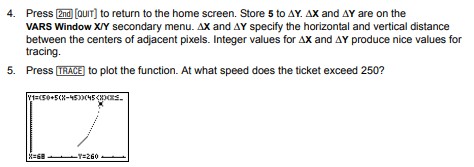
Let’s examine it closely this time. We can see that this uses the multiplication method that I said people tend to use:
Y = (50 + 5(X - 45))(45 < X)(X ≤ 55) +
    (100 + 10(X - 55))(55 < X)(X ≤ 65) +
    (200 + 20(X - 65))(65 < X)
If \(x\le45\), then the conditions evaluate to 1 or 0 as shown here:
Y = (50 + 5(X - 45))(0)(1) +
    (100 + 10(X - 55))(0)(1) +
    (200 + 20(X - 65))(0)
and we end up with 0. This is where a really accurate graph should instead be undefined.
If \(45<x\le55\), then the conditions evaluate to 1 or 0 as shown here:
Y = (50 + 5(X - 45))(1)(1) +
    (100 + 10(X - 55))(0)(1) +
    (200 + 20(X - 65))(0)
and we end up with just the first line, \((50+5(x-45)=5x-175\), which is correct.
If \(55<x\le65\), then the conditions evaluate to 1 or 0 as shown here:
Y = (50 + 5(X - 45))(1)(0) +
    (100 + 10(X - 55))(1)(1) +
    (200 + 20(X - 65))(0)
and we end up with just the second line, \(100+10(x-55)=10x-450\), which is correct.
And so on: Each product of two conditions is 1 only if both are true, so only that one case contributes to the sum.
When I wrote this, I wasn’t able to check it, and may have misread it:
I'm not even sure the manual's rather complicated example should really work, because they only include part of each condition; there may be some aspect that I am missing in my interpretation. You will find many sites that give examples like mine, including compound conditions, but don't tell you why you multiply or divide.

But other sites do explain why it works:
   http://www.dummies.com/education/graphing-calculators/how-to-graph-piecewise-
defined-functions-on-the-ti-84-plus/

   https://mathbits.com/MathBits/TISection/PreCalculus/piecewise.html

I've discussed it briefly here:

   Piecewise Functions on TI Graphing Calculators
   http://mathforum.org/library/drmath/view/67761.html

Each of these has a little variation from what I have said; you can experiment to see what method does what you want.

Having said all this ... while I do have the manual, I don't currently have a working TI-84. I can't verify what I have said, and so encourage you to check for yourself.
I’ve updated the Dummies link to a current one, but the current page does not display correctly; here is an archived version that works correctly.
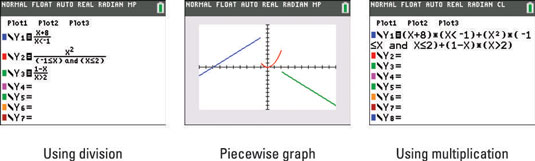
The MathBits page does the same, with some helpful additional hints.
What we see in the examples above are division using “and”, which has to be done as a set of separate functions because any division by 0 (false) would make it stop evaluating; and multiplication using “and”, which will result in 0 where the function is undefined. Neither source shows my multiplication-and-division method.
The rest of the conversation involved checking things I was unsure of, and explaining the reasons behind details. I’ll show only the most helpful parts.
More on methods using division
I’ll break Michael’s reply into several parts and intersperse my replies for simplicity:
Hi Doctor Peterson,

I wasn't aware of the "TI-84 for Dummies" book. After downloading TI's manual, and looking at its info on graphing piecewise functions, and checking out the "Dummies" book at the link you provided, I decided to buy it.

Studying your reply, I have started to grasp how the functions must be entered in order for the calculator to deliver the expected results. The multiplication approach was simplest for me to follow.

In the case of the division approach, when we enter y = (3)/(-10 ≤ x)(x < 3), are the operations carried out on the intervals as they would be on algebraic terms? In other words, is (x < 3) part of the divisor, or is it the result of (3)/(-10 ≤ x) multiplied by (x < 3)?
This last paragraph (really about my multiply-and-divide method) pertains to the order of operations; The latter interpretation is correct in this case.
I explained this (which gets us into a controversial area explained in Order of Operations: Implicit Multiplication?, which includes part of the link I’ll mention):
Hi, Michael.

When it comes to handling divisions, calculators do it in a variety of ways. But the way that is usually taught, and that your Texas Instruments model does it, is to do all multiplications and divisions from left to right -- even when no symbol is used for multiplication:

  Implied Multiplication and TI Calculators
  http://mathforum.org/library/drmath/view/72166.html

You can verify this by entering 3/2*4 and 3/2(4) and seeing that they both return 6, whereas 3/(2*4) and 3/2/4 return 3/8 = 0.375. I am assuming that they follow the same rule on these logical values (1 and 0) as for real numerical values, which only makes sense.
Why dividing by every condition doesn’t work
I took advantage of this fact when I divided by ONLY (-10 ≤ x), and NOT by (x < 3). This is because it is possible that if we divided by both (or by their product), it might display nothing, because some term would be undefined everywhere. But please check that out.

It is also conceivable that if one term is undefined but the other is not, your calculator might treat the undefined term as zero (just for this purpose). I think I saw some people saying to do that, but I don't think it could work.

So enter this:

   y = (3)/(-10 ≤ x)/(x < 3) + (5)/(3 ≤ x)/(x ≤ 10)

Then compare it to this:

   y = (3)/(-10 ≤ x)(x < 3) + (5)(3 ≤ x)/(x ≤ 10)

If your TI-84 shows the same graph for both, then I am wrong. (Some calculators break their own rules in special cases, recognizing what you likely have in mind.)
The first function here, which divides by both conditions in each term, is the same as dividing by the product; we saw earlier that it resulted in an empty graph, which is what I predicted here. Why? Because whenever the first term does not apply (because the condition is false), we are dividing by zero, which makes the entire function undefined. Since every value of x makes one condition or the other false, the function is never defined.
The only way to make division by an entire condition work is to break the function into separate functions, as we’ll see later. Adding terms doesn’t work in this case.
Why does my multiply-and-divide version work?
Back to Michael, now on the domain of the entire function:
With regard to y = (3)/(-10 ≤ x)(x < 3) + (5)(3 ≤ x)/(x ≤ 10), you stated:

> Here, my goal is to display nothing when the first or last comparison
> fails, so I divided by those.

Did you want nothing displayed because when those fail, you are dealing with numbers below -10 or above +10? in other words, values outside the -10 to +10 zone are not considered in the function?

Let's say I re-arrange the division function by switching positions for (-10 ≤ x) and (x < 3), so that I end up with

   y = (3)/(x < 3)(-10 ≤ x) + (5)(3 ≤ x)/(x ≤ 10)

When I graph this in a window with Xmin of -15 and Xmax of +15, I get the line segment y = 3 from x = -10 to x < +3.
My multiply-and-divide method works, as we saw:
y = (3)/(-6 ≤ x)(x < 3) + (5)(3 ≤ x)/(x ≤ 6)
The first term divides by \((-6\le x)\) and the second by \((x\le6)\), so the entire function is undefined when \(x\lt6\) and when \(x\gt6\), which is exactly when it should be. It multiplies the first term by \((x\lt3)\), so that is 3 over its appropriate interval, \(-6\le x\lt3\); and multiplies the second term by \((3\lt x)\), so it is 5 when \(3\le x\lt6\).
His version, because it divides by \((x<3)\) and \((x\le10)\), will be undefined when either is false, that is, for \(x\ge3\). Because it multiplies by \((-10\le x)\) and by \((3\le x)\), it is zero when both are false, namely for \(x\le-10\). It looks like this (using 6 in place of 10):
y = (3)/(x < 3)(-6 ≤ x) + (5)(3 ≤ x)/(x ≤ 6)

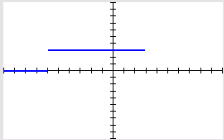
So to make it work, we have to divide only by the conditions that should make it undefined when false, and multiply by any others. This is the optimal combination of multiplication and division.
I confirmed the goal:
Right. Given

   y = { 3 if -10 ≤ x < 3
       { 5 if   3 ≤ x ≤ 10

This should be undefined outside of those intervals, and should show no graph outside of the domain, -10 ≤ x ≤ 10. When people use the multiplication method for graph conditions, they expect the graph to be hidden by the x-axis when the value is zero, so that it doesn't matter that it graphs the function for all real numbers; the reason for the division method is that it is then really graphing exactly what it should, even if the axes are turned off. For most purposes, the multiplication method is fine.
As we’ve seen, the multiplication method produces this, with the wrong domain,
while our goal is this:
And to the last paragraph there,
Okay, so you have done something like the test I asked for, above! And you confirmed my expectation. You have caused the function to be undefined for x ≥ 3, by dividing by zero, so that it didn't graph anything there.
A little more complicated
Let’s try something with more parts, but still with a contiguous domain:
$$f(x)=\left\{\begin{array}{l}x+4&\text{ if }-3\lt x\lt-1\\3-(x+1)^2&\text{ if }-1\le x\lt1\\5-x&\text{ if }1\le x\le5\\\end{array}\right.$$
In Desmos, this is
$$\left\{-3<x<-1:x+4,-1\le x<1:3-\left(x+1\right)^{2},1\le x\le5:5-x\right\}$$
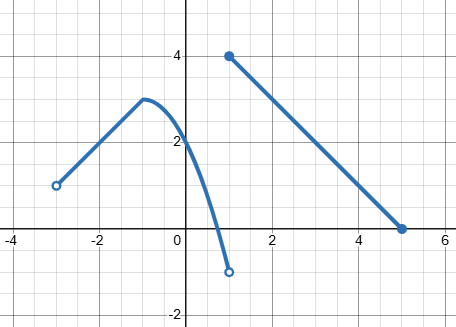
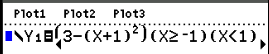
On the TI, I’ll use the multiply-and-divide approach, dividing only by the first and last conditions:
y = (x + 4)/(x > -3)(x < -1) + (3 – (x + 1)^2)(x ≥ -1)(x < 1) + (5 – x)(x ≥ 1)/(x ≤ 5)/


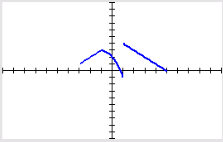
A lot more complicated
What if the domain is not contiguous domain, like this?
$$f(x)=\left\{\begin{array}{l}x+4&\text{ if }-3\le x\le-1\\2-x&\text{ if }-1\lt x\lt2\\x-3&\text{ if }3\lt x\le5\\\end{array}\right.$$
On Desmos, this looks like
$$\left\{-3\le x\le-1:x+4,-1<x<2:2-x,3<x\le5:x-3\right\}$$
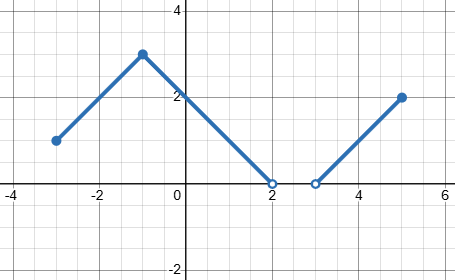
On the TI, we need to divide by the first and last conditions (to hide the outside of the domain), and do something special to deal with the omitted interval \([2,3]\):
y = (x + 4)/(x > -3)(x < -1) + (2 – x)(x ≥ -1)(x < 2) + (x – 3)(x > 3)/(x ≤ 5)/(x < 2 or x > 3)




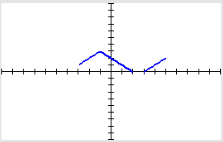
There are several variations I can imagine. All are somewhat awkward work-arounds for the features TI lacks.
Using “and” with multiplication or division
Michael finished his series of questions with this:
One last thing: how would you enter this function using "and" in LOGIC?

I tried entering just the first half as y1 = (3)(-10 ≤ x) and (x < 3), and I got y = 1 for the domain of [-10, 3).

I then entered it using the n/d template, y1 = 3/(-10 ≤ x) and (x < 3), and I got the expected result of y = 3 for the domain of [-10, 3).

Thank you,
Michael
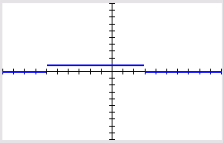
The first attempt here uses multiplication with “and”, and has an order of operations problem, as I explained:
Note that you have to put the subexpression with "and" in parentheses so that the "and" is executed at the right time. The way you wrote it, it would be interpreted in the interval as

   y1 = (3)(-10 ≤ x) and (x < 3)
           \_______/      \___/
         3   *  1    and    1
         \______/
             3       and    1
             \______________/
                     1           (that is, true and true = true)

Using division,

  y1 = (3)/(-10 ≤ x) and (x < 3)
           \_______/      \___/
        3 /     1    and    1
        \_______/
           3         and    1
           \________________/
                     1          (that is, true and true = true)
That explains the 1 he got:
y1 = (3)(-6 ≤ x) and (x < 3)

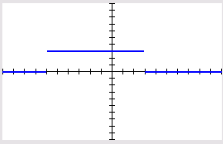
If we do it correctly with multiplication, we get this:
y1 = (3)(-6 ≤ x and x < 3)

As for the division version, his reference to the “n/d template” means making a fraction (using the FRAC menu under MATH), so that the denominator is taken as all of “(-10 ≤ x) and (x < 3)”, which is not literally what he wrote here. He actually used
               3
y1 = ---------------------
     (-10 ≤ x) and (x < 3)
I pointed out, as we’ve seen, that “and”, like complete division, can’t be used when we add terms together:
I don't think you can use "and" and get this effect of blanking the graph outside the domain. The "and" treats both arguments the same, so if you multiply (3)(-10 ≤ x and x < 3), you will get 0 outside; if you divide (3)/(-10 ≤ x and x < 3), it will be undefined everywhere outside the interval, so you couldn't add a term that is restricted to another interval.
It is not the “and”, but the addition, that keeps this from working. As the references I’d found point out, any solution using division only (with or without “and”) has to be done as two separate functions, like this:
y1 = 3/(-6 ≤ x and x ≤ 3)
y2 = 5/(3 ≤ x and x ≤ 6)
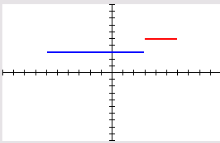
This way, when one piece is undefined, it doesn’t prevent the other from being graphed; this may be what Michael was doing, as he showed only the one term.
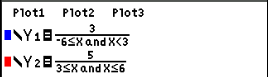
Here is the division version using a fraction:
y1 = \(\frac{3}{-6 ≤ x\text{ and }x ≤ 3}\)
y2 = \(\frac{5}{3 ≤ x\text{ and }x ≤ 6}\)
Final thoughts: How logic works on the TI-84
Michael had a final question related to my comments on his incorrect order of operations with multiplication:
You also wrote:

>    y1 = (3)(-10 ≤ x) and (x < 3)
>            \_______/      \___/
>          3   *  1    and    1
>          \______/
>              3       and    1
>              \______________/
>                      1           (that is, true and true = true)

Is this saying that for x = 1, for example, the calculator says "yes, 1 is greater than -10," resulting in 3 * 1? and then places the logical operator "and" after 3 * 1, says "yes, 1 is less than 3," resulting in another 1 after the "and"?

To try to understand the last step of your explanation, I entered y1 = 1 and 3, and the calculator returned 1 everywhere, just as your explanation stated it would. Could you explain why that is so? I guess I don't understand why "3 and 1" is true.

Thank you again for entertaining my questions. As someone who likes to understand more than just how to plug and chug for correct answers, your thorough explanations are invaluable. It is especially kind of you to go to the trouble of digging into the manual to further your explanations.

Sincerely,
Michael
I replied:
The calculator (like many programming languages) uses 1 and 0 as the outputs for comparisons that produce a logical TRUE or FALSE respectively. But (unlike many programming languages) it doesn't care that these numbers mean TRUE and FALSE when they are used in arithmetic; it just treats them as ordinary numbers. If it paid attention to meaning (data type), it would see that you told it to calculate "3 * TRUE," and refuse to do it. But instead, it just does what you told it to do, multiplying 3 times 1 and getting 3.

But when it (like many programming languages) is given a number where it expects 1 or 0, meaning TRUE or FALSE, it takes *any* non-zero number as TRUE. That is, whereas on output it produces 1 for TRUE, on input 0 means FALSE and anything else means TRUE. (At least, that is what it appears to do; I don't recall that the manual explicitly says that.)
Michael’s experiment effectively proves this!
So when you tell it to calculate "3 and 1," that is, "3 and TRUE," it interprets that as "TRUE and TRUE," which produces the value TRUE (1).

The designers could have decided to make it output an error when a logical operation was given anything other than 0 or 1. So either they had a reason to allow this, or they just didn't see a good reason not to.
This is not uncommon in programming languages that are not “strongly typed”. They don’t want to refuse any request, so they make the best of whatever they are given.
> As someone who likes to understand more than just how to plug and chug
> for correct answers, your thorough explanations are invaluable.

Absent clues from the manual, it is always fun to try to figure out what a device is really doing!

And when someone likes to really understand things, that makes it worthwhile.
And that’s why I like this discussion!